> ## Documentation Index
> Fetch the complete documentation index at: https://docs-dev-docs-ai-docs-migration-poc.mintlify.site/llms.txt
> Use this file to discover all available pages before exploring further.
# M2Mアクセスを取り消す
> アプリケーションのM2Mアクセスを取り消す方法を説明します。
export const AuthCodeBlock = ({filename, icon, language, highlight, children}) => {
const [displayText, setDisplayText] = useState(children);
const [copyText, setCopyText] = useState(children);
const wrapperRef = React.useRef(null);
useEffect(() => {
let unsubscribe = null;
function init() {
if (!window.autorun || !window.rootStore) {
return;
}
unsubscribe = window.autorun(() => {
let processedChildrenForDisplay = children;
let processedChildrenForCopy = children;
for (const [key, value] of window.rootStore.variableStore.values.entries()) {
const escapedKey = key.replaceAll(/[.*+?^${}()|[\]\\]/g, (String.raw)`\$&`);
let displayValue = value;
if (key === "{yourClientSecret}" && value !== "{yourClientSecret}") {
displayValue = value.substring(0, 3) + "*****MASKED*****";
}
processedChildrenForDisplay = processedChildrenForDisplay.replaceAll(new RegExp(escapedKey, "g"), displayValue);
processedChildrenForCopy = processedChildrenForCopy.replaceAll(new RegExp(escapedKey, "g"), value);
}
setDisplayText(processedChildrenForDisplay);
setCopyText(processedChildrenForCopy);
});
}
if (window.rootStore) {
init();
} else {
window.addEventListener("adu:storeReady", init);
}
return () => {
window.removeEventListener("adu:storeReady", init);
unsubscribe?.();
};
}, [children]);
useEffect(() => {
if (!wrapperRef.current) return;
const originalWriteText = navigator.clipboard.writeText.bind(navigator.clipboard);
let isOverriding = false;
const handleClick = e => {
const button = e.target.closest('[data-testid="copy-code-button"]');
if (!button || !wrapperRef.current.contains(button)) return;
isOverriding = true;
navigator.clipboard.writeText = text => {
if (isOverriding) {
isOverriding = false;
navigator.clipboard.writeText = originalWriteText;
return originalWriteText(copyText);
}
return originalWriteText(text);
};
setTimeout(() => {
if (isOverriding) {
isOverriding = false;
navigator.clipboard.writeText = originalWriteText;
}
}, 100);
};
const wrapper = wrapperRef.current;
wrapper.addEventListener('click', handleClick, true);
return () => {
wrapper.removeEventListener('click', handleClick, true);
if (navigator.clipboard.writeText !== originalWriteText) {
navigator.clipboard.writeText = originalWriteText;
}
};
}, [copyText]);
return
{displayText}
;
};
M2Mアクセスを取り消す、またはアプリケーションの組織へのアクセスを削除するには、クライアントの許可と組織との関連付けを削除する必要があります。この関連付けが削除されると、アプリケーションは、許可で定義されたAPIの新しいトークンを要求するときに組織を使用できなくなります。
M2Mアクセスを無効にしても、組織へのアクセスが許可されているアプリケーションには影響しません。詳細については、「[組織の動作を定義する](/docs/ja-jp/manage-users/organizations/organizations-for-m2m-applications/configure-your-application-for-m2m-access#define-organization-behavior)」をお読みください。
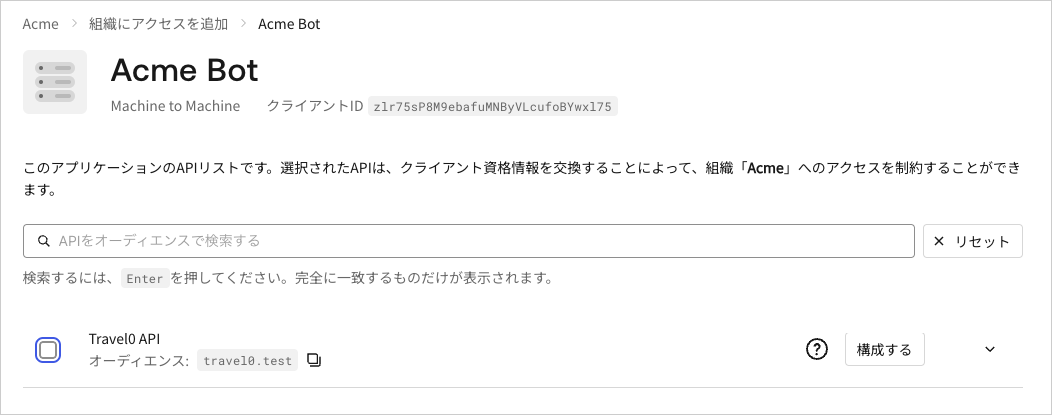
[Auth0 Dashboard](https://manage.auth0.com/)を介して、アプリケーションのクライアントの許可とOrganization間の関連付けを削除するには:
1. **[Organizations(組織)]** に移動して、関連付けを削除したい**Organizationを選択** します。
2. **[Machine-to-Machine Access(マシンツーマシンアクセス)]** タブを選択します。
3. アプリケーションを選択します。
4. Organizationとの関連付けを解除したいAPIの横にあるボックスのチェックマークを外します。
5. **[Save(保存)]** をクリックします。
 アプリケーションクライアントの許可と組織の関連付けは、[組織からクライアント許可の関連付けを解除する](/docs/ja-jp/api/management/v2/organizations/delete-client-grants-by-grant-id)エンドポイントを介して削除できます。
```bash theme={null}
export const codeExample = `curl -X DELETE --location "https://{yourDomain}/api/v2/organizations/{ORG_id}/client-grants/{GRANT_ID}" \
--header 'authorization: Bearer MGMT_API_ACCESS_TOKEN' `;
```
アプリケーションクライアントの許可と組織の関連付けは、[組織からクライアント許可の関連付けを解除する](/docs/ja-jp/api/management/v2/organizations/delete-client-grants-by-grant-id)エンドポイントを介して削除できます。
```bash theme={null}
export const codeExample = `curl -X DELETE --location "https://{yourDomain}/api/v2/organizations/{ORG_id}/client-grants/{GRANT_ID}" \
--header 'authorization: Bearer MGMT_API_ACCESS_TOKEN' `;
```